← Back To Brands
Dehancer · Film Emulation · Travel & Street · 2026
Dehancer Discount Code · Updated 2026

Dehancer
Discount Code
10% Off.

Use my Dehancer discount code SIMONSONGHURST to save 10% on a qualifying Dehancer purchase — and bring genuine film-inspired colour, grain, halation and bloom into your photography and filmmaking workflow.

View current plan prices in
Get Dehancer & Save 10% → Watch My Dehancer Video →

USE CODE SIMONSONGHURST AT CHECKOUT · CHECK THE FINAL SAVING AND ELIGIBILITY BEFORE PAYMENT.

Simon Songhurst Dehancer Code 10% OFF
SIMONSONGHURST

Copy the code, choose your Dehancer plan or product and apply it in the promotional-code field during checkout.

Open Dehancer →
Dehancer film emulation used for travel photography and cinematic filmmaking by Simon Songhurst
Dehancer in my photography & filmmaking workflow Watch The Video →
10% Off Code SIMONSONGHURST
60+ Films Film profiles with Push / Pull
130+ Cameras Camera Log profiles
Photo + Video Multiple creative host applications
Quick Answer

What Is The
Dehancer
Discount Code?

My Dehancer promo code is SIMONSONGHURST. Enter it in Dehancer's promotional-code field during checkout to receive 10% off an eligible purchase.

If you haven't used Dehancer before, I'd download the free demo first. The demo includes the tools and film profiles, so you can find out whether the look actually suits your photography or filmmaking before buying.

Current Dehancer Pricing

Which Plan
Do You Need?

Dehancer's current individual subscriptions are split between Mobile, Photo and combined Photo + Video. Prices below use Dehancer's USD yearly-billed pricing as the master price; converted currencies are approximate.

Mobile

Mobile

£4.52 /mo
billed yearly

The entry point for an iPhone and iPad-based workflow.

  • Dehancer iOS photo + video
  • Dehancer Online
  • 2 seats
  • 1 seat per host / app
See Mobile Plan →
Photographers

Photo

£9.78 /mo
billed yearly

The logical option if your workflow is primarily still photography.

  • Photoshop
  • Lightroom / Lightroom Classic
  • Capture One
  • Affinity Photo support
  • Dehancer Desktop
  • Dehancer iOS photo
  • 3 seats across supported hosts
See Photo Plan →
My Pick For Hybrid Creators

Photo + Video

£21.82 /mo
billed yearly

The most relevant option if your work moves between still photography and filmmaking.

  • Everything in Photo
  • DaVinci Resolve
  • Final Cut Pro
  • Premiere Pro
  • After Effects
  • Vegas Pro
  • iOS photo + video
See Photo + Video →

DEHANCER PRICES ITS PLANS IN USD. CONVERTED FIGURES ABOVE ARE INDICATIVE ONLY. TAXES, EXCHANGE RATES AND PROMOTIONS MAY CHANGE THE FINAL PRICE.

Why I Use Dehancer

I Don't Want
Travel To Look
Too Perfect.

For me, the attraction isn't making digital footage look “old”. It's getting away from the overly clean, clinical character digital cameras can sometimes produce.

Travel and street photography is often about atmosphere as much as technical perfection. Light bouncing off an old building, neon signs at night, summer haze, a slightly dirty railway window or the texture of a street can be more important than producing the cleanest possible file.

The same applies when I'm making travel films. I don't necessarily want every highlight perfectly controlled and every surface clinically sharp. Sometimes a little bloom around a bright source, texture in the grain and a softer transition through colour makes the scene feel far more convincing.

That's where Dehancer fits my workflow. I can start with a real film-inspired profile and then decide how far I want to take the analogue characteristics rather than simply dropping a heavy cinematic LUT over everything.

I tend to prefer it when it's used with restraint. The objective isn't to make everybody notice the plugin. It is to make the final photograph or film feel right.

More Than A LUT

Where The
Film Character
Comes From.

Dehancer isn't simply a collection of colour presets. Its current Pro toolset models several characteristics associated with analogue capture, processing and printing.

01 / Film

60+ Film Profiles

Start with different film stocks and Push / Pull variations rather than treating every image with the same generic cinematic preset.

02 / Texture

Film Grain

Adds structure and texture in a way that can help digital images feel less sterile when used carefully.

03 / Light

Halation

Recreates the coloured glow and edge behaviour around strong highlights associated with film capture.

04 / Highlight

Bloom

Softens and spreads bright light, something I particularly like around windows, street lights, sun and reflective travel scenes.

05 / Motion

Film Breath + Gate Weave

Adds subtle instability and movement associated with film transport for projects where a more analogue presentation suits the story.

06 / Imperfection

Film Damage

Adds physical imperfections when you intentionally want the materiality of film to become part of the visual treatment.

07 / Print

Print Film + Papers

Includes print-film and photographic-paper style rendering for building the look beyond the initial negative-film profile.

08 / Camera

130+ Log Profiles

Camera profiles help connect modern digital acquisition with Dehancer's film-emulation pipeline across supported cameras.

Why It Fits Travel & Street

Different Light.
Different Places.
One Language.

What interests me is using Dehancer to create continuity without making every location look identical.

Street Photography

Texture Over Perfection

Grain, softer highlight behaviour and film profiles can work particularly well with observational street photography.

Travel Photography

Atmosphere & Memory

A travel photograph often benefits from feeling remembered rather than merely recorded with perfect digital neutrality.

Travel Films

Cohesive Moving Images

Film profiles and analogue effects can help footage from different scenes and cameras sit together within one visual language.

Night & Cities

Highlights Come Alive

Halation and bloom are particularly interesting around neon, street lamps, car lights, windows and illuminated architecture.

Software Compatibility

Where Can You
Use Dehancer?

Dehancer currently spans both stills and motion applications. Exact versions and system requirements vary, so check the current requirements before purchasing.

Video

DaVinci Resolve

One of Dehancer's most complete colour workflows, including advanced pipelines such as DaVinci Wide Gamut, ACES and Cineon.

Adobe Video

Premiere + After Effects

Current Dehancer Pro support covers Adobe Premiere Pro and After Effects for video and motion work.

Apple

Final Cut Pro

Film-emulation tools are also available for Final Cut Pro-based filmmaking workflows.

Photography

Photoshop + Lightroom

Dehancer's Photo workflow supports Photoshop and Lightroom / Lightroom Classic alongside other stills hosts.

Photography

Capture One

Useful for photographers whose RAW workflow already revolves around Capture One.

Beta

Affinity Photo

Dehancer currently lists Affinity Photo compatibility in beta, so check current limitations before relying on it professionally.

Mobile

iPhone + iPad

Mobile tools bring Dehancer's film-inspired approach into a lighter photo and video workflow.

Standalone

Dehancer Desktop

The Photo plan also includes Dehancer Desktop for photographers wanting a workflow outside their normal host application.

Found The Dehancer Version You Need?

Copy my code, open Dehancer and apply it during checkout. Confirm that the 10% saving appears before you complete your purchase.

SIMONSONGHURST
Use My Dehancer Code →
Before You Buy Try It
Free.

Dehancer allows its products to be downloaded and tested before activation. Unlicensed output carries a watermark and the LUT Generator is disabled.

My Recommendation

Don't Buy A Film Look
You Haven't Tried.

Colour is subjective. A film-emulation tool can have all the features in the world, but the only thing that matters is whether you actually like what it does to your photographs and footage.

Dehancer lets you download the software and work with the tools and film profiles before activating a paid licence. That is exactly how I would approach it.

Put some real files through it. Use footage from a trip, difficult mixed lighting, skin tones, a city at night and some everyday photographs. Try the film profiles first, then slowly introduce Grain, Halation and Bloom.

If you like the direction, then use SIMONSONGHURST when you buy.

Download & Try Dehancer →
Redeem The Offer

How To Get
10% Off.

Dehancer has a dedicated promotional-code field in its checkout process.

01

Open Dehancer

Follow one of the Dehancer buttons on this page and choose the product or plan that matches your workflow.

02

Choose Your Host

Make sure you're purchasing for the editing or photography application you actually intend to use.

03

Enter The Code

Type SIMONSONGHURST into the promotional-code field and select Apply.

04

Confirm The Saving

Check that the 10% discount has appeared in the checkout total before completing payment.

Dehancer Discount FAQ

Before You Buy

What is the Dehancer discount code for 2026?
Use SIMONSONGHURST during Dehancer checkout to receive 10% off a qualifying purchase. Always confirm that the saving has been applied before completing payment.
How do I use the SIMONSONGHURST Dehancer code?
Choose your Dehancer product or subscription, continue to checkout, enter SIMONSONGHURST in the promotional-code field and select Apply. Confirm the final discounted price before paying.
Is there a free Dehancer trial?
Dehancer currently allows its products to be downloaded and run without activation so you can test the tools and profiles. Unactivated output carries a watermark and the LUT Generator is disabled.
How much does Dehancer cost?
Dehancer's current individual yearly-billed plans are listed in USD at $6/month for Mobile, $13/month for Photo and $29/month for Photo + Video. Pricing, taxes and promotions can change, so confirm the live amount directly with Dehancer.
Which Dehancer plan is best for photographers?
The Photo plan is the natural starting point for photographers using applications such as Photoshop, Lightroom or Capture One. Hybrid photographers and filmmakers should compare it with Photo + Video.
Which Dehancer plan is best for filmmakers?
The current Photo + Video subscription includes video support for applications including DaVinci Resolve, Final Cut Pro, Premiere Pro and After Effects, as well as the stills tools included in the Photo plan.
Does Dehancer work with DaVinci Resolve?
Yes. Dehancer Pro currently supports DaVinci Resolve and includes 60+ film profiles, grain, halation, bloom, print films, camera profiles and advanced colour-pipeline options.
Does Dehancer work with Premiere Pro and After Effects?
Yes. Dehancer currently supports Premiere Pro and After Effects through its Adobe video plugin.
Does Dehancer work with Final Cut Pro?
Yes. Final Cut Pro is one of Dehancer's currently supported video host applications.
Does Dehancer work with Lightroom and Photoshop?
Yes. Dehancer's photography workflow supports Photoshop and Lightroom / Lightroom Classic, alongside other supported photography applications.
Does Dehancer work with Capture One?
Yes. Capture One is currently included within Dehancer's photography host support. Check Dehancer's current workflow documentation because integration methods can differ between applications.
How many film profiles does Dehancer have?
Dehancer currently advertises more than 60 film profiles with Push / Pull options, as well as print-film and photographic-paper rendering.
What is Dehancer Halation?
Halation is designed to emulate the characteristic coloured glow and edge behaviour that can appear around strong highlights on film. It can be especially effective around practical lights, neon and bright windows when used subtly.
What is Dehancer Bloom?
Bloom models the spread or softening of bright light. It can make strong highlights feel less clinically digital and is particularly useful for bright travel scenes, sunsets and night photography.
Is Dehancer good for travel and street photography?
I think it is particularly interesting for travel and street work because the tools focus on colour, texture and analogue imperfections rather than simply making the image technically cleaner.
Is Dehancer just a collection of LUTs?
No. Dehancer includes film profiles alongside tools such as Film Grain, Halation, Bloom, Film Breath, Gate Weave, Film Damage, print-film rendering, camera profiles and other film-emulation controls.
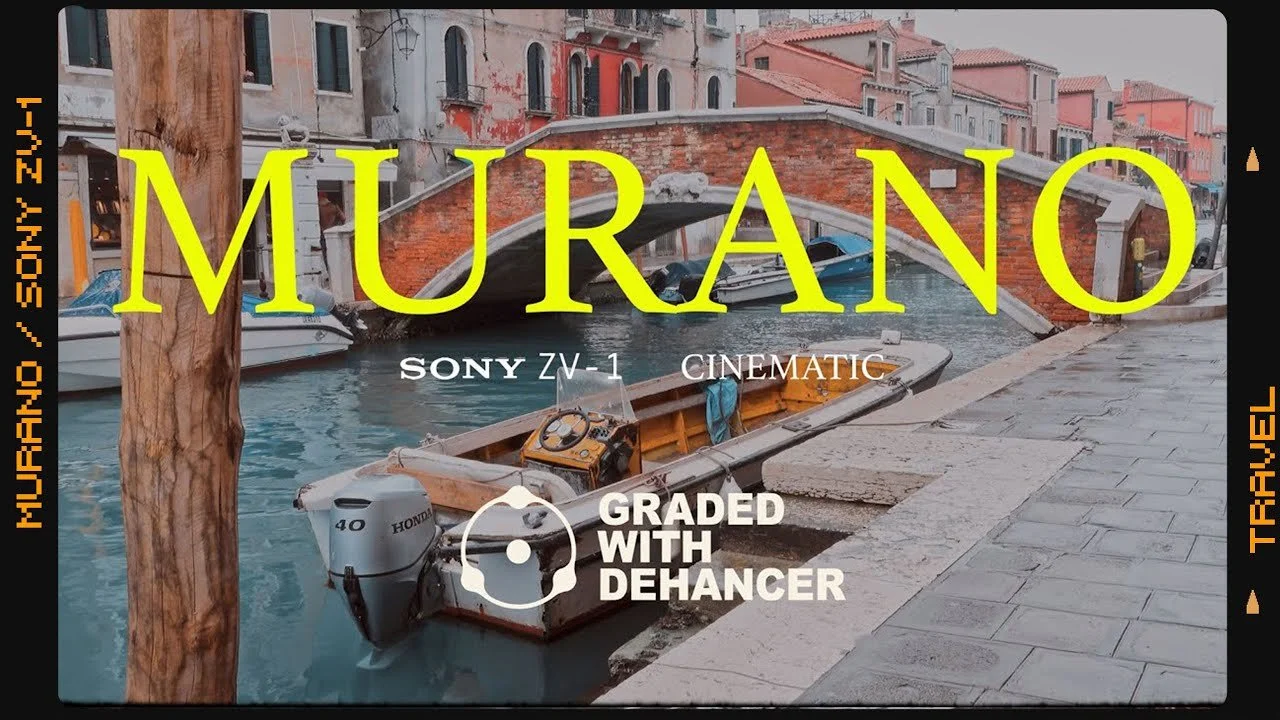
Current Dehancer Offer

Try The Look.
Then Save 10%.

Test Dehancer on your own photographs and footage first. If it fits your workflow, copy my code and apply it when you're ready to buy.

SIMONSONGHURST
Get Dehancer & Save 10% → ← Back To Brands
AFFILIATE DISCLOSURE: This page contains Dehancer affiliate links. If you make an eligible purchase after using one of these links or my discount code, I may receive a commission at no additional cost to you. Dehancer controls its prices, products, promotional eligibility, software compatibility and licensing terms, all of which can change. Always confirm the final price and terms directly with Dehancer before purchasing.
0
Skip to Content
WORKFLOW & REVIEWS
PHOTOGRAPHY
WORKFLOWS
REVIEWS
BRANDS
BLOG
WORK WITH ME
WORKFLOW & REVIEWS
PHOTOGRAPHY
WORKFLOWS
REVIEWS
BRANDS
BLOG
WORK WITH ME
PHOTOGRAPHY
WORKFLOWS
REVIEWS
BRANDS
BLOG
WORK WITH ME