Back to Brands Simon Songhurst · Audio for photography and film

BOYA Microphone
Deals

Shop BOYA wireless microphones for interviews, behind-the-scenes clips and video shot on a phone or camera. Follow my link to see available offers on eligible kits. There’s no code to enter from this page.

See BOYA offers
BOYA mini 2 wireless microphone kit with transmitters, receiver and charging case
BOYA mini 2 kit. Image by BOYA.
BOYA shopping offers

Choose your kit and check the retailer’s price and any coupon shown on the listing before ordering.

Phone kitsCheck USB-C or Lightning
Camera kitsCheck for a 3.5 mm output
Two-person audioChoose a two-transmitter kit
Current offersDisplayed by the retailer

How to find BOYA discounts

My BOYA link takes you to the shopping offer. The retailer shows the current price and any eligible savings for the model, bundle and delivery region you select.

  1. Open the shopping link

    See which BOYA products and offers are available.

  2. Pick your receiver

    Match the kit to your phone port or camera input.

  3. Check the offer

    If the listing shows a coupon to select, apply it on the retailer’s page.

  4. Review the total

    Check the final price, delivery and any taxes before paying.

See BOYA offers

Which BOYA microphone fits your shoot?

I’d choose by what I’m filming and where my audio needs to end up. A phone-first kit, an interview mic and a wireless system with onboard recording solve different problems.

BOYA mini 2

My starting point for a phone-based behind-the-scenes clip, a piece to camera or a quick two-person interview. BOYA specifies 48 kHz, 24-bit audio. Check the listing for USB-C or Lightning, how many transmitters are included and whether you get the charging case.

BOYA mini 2 specifications and kits

BOYAMIC 2

I’d look here for a client interview or a take I can’t repeat. Its transmitters support onboard 32-bit float recording, so I can keep a separate recording alongside the audio sent to the camera. Enable onboard recording and check that it’s running before the interview.

BOYAMIC 2 specifications

BOYA Magic

I’d look at Magic if I needed one kit for a clipped-on presenter, a handheld interview and occasional desk or camera-mounted use. Its four configurations use different mounting pieces. Check the box contents for the exact kit you’re buying.

BOYA Magic configurations

What I check before recording

When I’m moving between stills and video, I want the audio setup ready before anyone starts talking.

Signal into the right device

On a camera, check the mic input and set a usable recording level. On a phone, check that the receiver clears the case and that the recording app is using the external mic.

Clean placement

Clip the mic where it won’t rub on a jacket or camera strap. Outdoors, fit the windscreen and listen to a short recording before committing to the take.

Separate voices when needed

For an interview, put a transmitter on each speaker. If the kit supports separate channels, test that they reach your recording device as expected so you can adjust each voice in the edit.

What does BOYA make?

BOYA makes audio equipment for creators, from wireless clip-on microphones and wired lavaliers to on-camera microphones, USB and studio mics, and mixers. Its catalogue also includes conference microphones and the Notra range of voice recorders. The common thread for my work is getting spoken audio into a video setup I can carry alongside my stills kit. BOYA’s product catalogue

Wireless lavalier, wired lavalier or on-camera mic?

A wireless clip-on makes sense when I’m directing from behind the camera and the person speaking needs to move. For a fixed setup at close range, I’d also consider a wired lavalier such as BOYA’s BY-M1 and check the connector against the recording device. For scratch audio or a close subject with no time to fit a clip-on, BOYA’s compact BY-MM1 is a camera-mounted cardioid mic. When the subject is across the room, I’d bring the mic closer to them. BOYA BY-MM1 specifications · BOYA BY-M1 manual

When I’d use noise reduction

For dialogue on a noisy location, I’d record a short test with noise reduction on and off. For a behind-the-scenes film, the sound of the room can tell part of the story, so I’d listen for what the processing takes out along with the background noise.
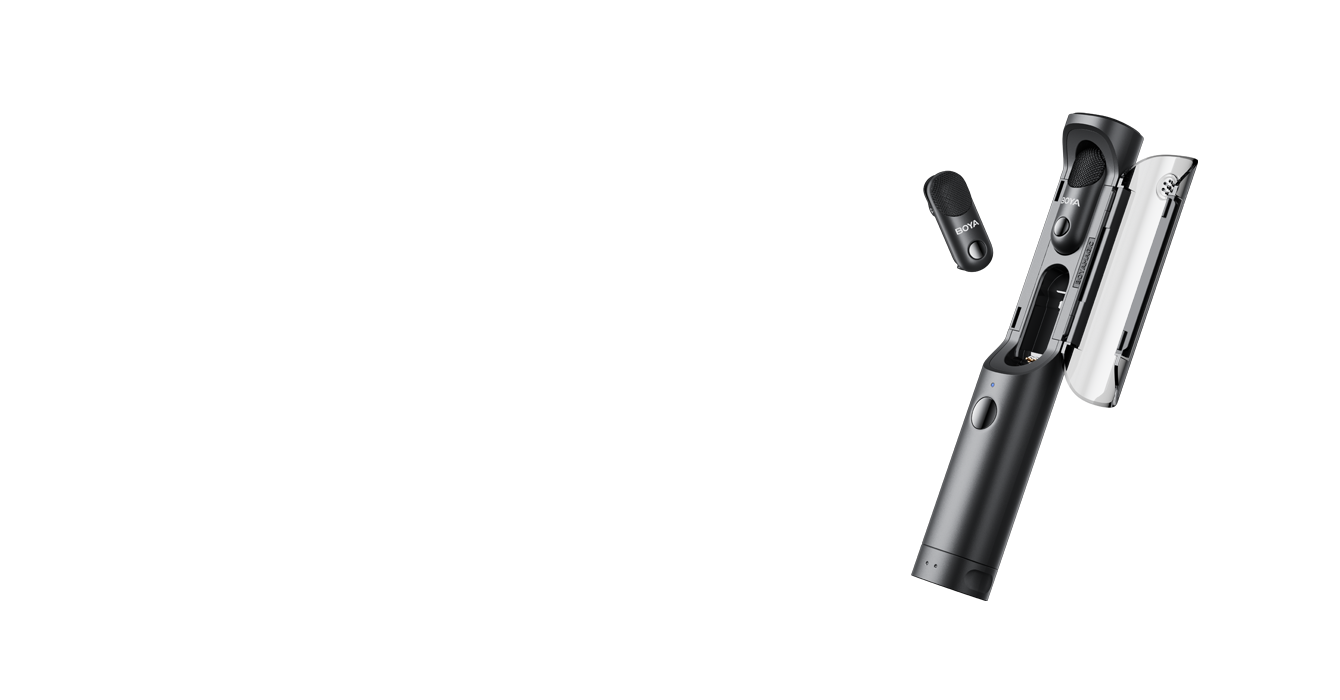
BOYA Magic convertible wireless microphone
BOYA Magic. Image by BOYA.

BOYA deals and microphone FAQs

Do I need a BOYA discount code?
There’s no code from me. Use my shopping link to see available BOYA offers. Confirm the discount in your order summary before buying.
Will every BOYA kit be discounted?
Offers can vary with the model, bundle, seller and delivery region. The retailer shows the current price and any coupon or promotion for your selection.
Which BOYA mic works with an iPhone?
Choose a receiver that matches your iPhone’s port. BOYA sells mini 2 bundles with USB-C and bundles that include both USB-C and Lightning receivers. Check the exact kit contents.
Which BOYA mic can record two people?
Pick a kit with two transmitters and a receiver that supports both. Check for separate-channel output if you want to adjust each speaker independently in the edit.
Does BOYAMIC 2 have onboard recording?
Yes. BOYA documents onboard recording on the transmitters, including a 32-bit float mode. Enable it before relying on it as a backup.

See current BOYA offers

Choose the microphone and receiver for your setup, then check the price on the retailer’s listing.

See BOYA offers
Affiliate disclosure. I earn a commission on qualifying purchases made through links on this page.
0
Skip to Content
WORKFLOW & REVIEWS
WORKFLOWS
REVIEWS
PHOTOGRAPHY
BRANDS
ABOUT
WORK WITH ME
THE EDIT
WORKFLOW & REVIEWS
WORKFLOWS
REVIEWS
PHOTOGRAPHY
BRANDS
ABOUT
WORK WITH ME
THE EDIT
WORKFLOWS
REVIEWS
PHOTOGRAPHY
BRANDS
ABOUT
WORK WITH ME
THE EDIT
Simon Songhurst — Footer preview

Simon Songhurst

Photographer, filmmaker and creator.
Practical workflows, gear reviews and the tools behind the work.

Explore

  • Home
  • Workflow tutorials
  • Gear reviews
  • Journal & articles
  • Brands & creator offers
  • About Simon
  • Commercial photography ↗

Watch on YouTube

  • Workflows & tutorials ↗
  • Gear & Tech ↗
  • PackPort ↗
  • Travel & Street ↗

Work together

Software tutorials, equipment reviews and creative brand collaborations.

youtube@simonsonghurst.comWork with Simon ↗

Browse guides & brand offers

Photography & editing tutorials
  • Capture One on iPad: wired & wireless tethering
  • Retouching with Wacom Movink
  • Fujifilm X-T4 meets Capture One on iPad
  • A client workflow with Moodcase
  • Getting started with Capture One
  • Build a mood board in Apple Freeform
  • Getting started with Nik Collection
  • Beauty retouching in Photoshop
  • A portable Capture One tethering setup
  • Film emulation with Dehancer
  • Getting started with DxO PhotoLab
  • Beauty retouching with Evoto AI
  • Beauty retouching in Capture One
  • AI retouching with Photoshop & Retouch4me
DaVinci Resolve & filmmaking
  • Skin retouching in DaVinci Resolve
  • Beauty colour grading with ToneLab Chroma Pro
  • A faster edit in DaVinci Resolve
  • Retouch4me for DaVinci Resolve
  • Beauty Box in Final Cut Pro
  • Getting started with Final Cut Pro
Software codes & offer details
  • Adobe
  • CineColor
  • Color Precision
  • Dehancer
  • DxO PhotoLab
  • DxO PureRAW
  • Evoto
  • Excire
  • Luminar
  • Motion VFX
  • Mylio Photos
  • Nik Collection
  • ON1 Photo RAW
  • Retouch4Me
  • Tonelab Chroma
Music & audio offers
  • Artlist
  • Audiio
  • Epidemic Sound
  • Soundstripe
Camera gear, carry & accessories
  • 7 Artisans
  • Aura Frames
  • Black Ember
  • FREEWELL
  • Grams 28
  • Gomatic
  • Kraft Geek
  • NEEWER
  • Peak Design
  • Photoolex
  • PLANCK
  • Sirui
  • TACTICAL GEEK
  • Thypoch Lenses
  • Viltrox
  • ZHIYUN
Creative tools & service offers
  • IONOS
  • Milanote
  • Moodcase
  • Pic-Time
  • Set A Light 3D
  • Skillshare
  • Three Mobile

© Simon Songhurst / Photography, filmmaking & creative workflows

Instagram ↗TikTok ↗